Excel Course Singapore | WSQ-Accredited, SkillsFuture Credit
 | 2 Days Course |
 | SkillsFuture Credit |
| PSEA, UTAP Eligible |
- Course Overview
- Course Outline
- Requirements
- FAQs
Course Objectives
This Microsoft Excel course provides learners with a fundamental understanding of spreadsheet concepts to effectively use the software. Participants will gain proficiency in developing, formatting, modifying, and utilising spreadsheets with standard formulas and functions. They will also demonstrate competence in creating and formatting insightful graphs and charts.
This programme is WSQ-accredited and eligible for SkillsFuture Credit, Post-Secondary Education Account (PSEA), and NTUC Union Training Assistance Programme (UTAP) funding, making it an accessible investment in your digital literacy.
On completion of this Microsoft excel course, each learner will be able to:
- Spreadsheet Management: Work confidently with spreadsheets, including saving them in various file formats.
- Data Entry & Manipulation:
- Enter data into cells and employ best practices for creating lists.
- Efficiently select, sort, copy, move, and delete data.
- Edit rows and columns within a worksheet.
- Copy, move, delete, and appropriately rename worksheets.
- Formula Creation:
- Create mathematical and logical formulas using standard spreadsheet functions.
- Apply best practices for formula creation and recognise common error values.
- Formatting:
- Format numbers and text content effectively within a spreadsheet.
- Productivity & Presentation:
- Utilise built-in options like the Help function to enhance overall productivity.
- Choose, create, and format charts to communicate information meaningfully.
- Printing & Review:
- Adjust spreadsheet page settings for optimal presentation.
- Thoroughly check and correct spreadsheet content before printing.
- Set print areas for specific output requirements.
Mode of Training
Classroom
Available in
English
Course Funding Options
Funding Eligibility Criteria
| Individual Sponsored Trainee | Company Sponsored Trainee |
| Singapore Citizens or Singapore Permanent ResidentsFrom 1 October 2023, attendance-taking for SkillsFuture Singapore’s (SSG) funded courses must be done digitally via the Singpass AppTrainee must pass all tests/assessments and attain 100% competency | Singapore Citizens or Singapore Permanent ResidentsFrom 1 October 2023, attendance-taking for SkillsFuture Singapore’s (SSG) funded courses must be done digitally via the Singpass AppTrainee must pass all tests/assessments and attain 100% competency |
Funding Types
| Individual Sponsored Trainee | Company Sponsored Trainee |
| SkillsFuture:Eligible Singapore Citizens may utilise their SkillsFuture Credits to offset course fees PSEA:Eligible Singapore Citizens may utilise their Post-Secondary Education Account (PSEA) fund to offset course fees | Absentee Payroll (AP) Funding: $4.50 per hour, capped at $100,000 per organisation per calendar year.AP funding will be computed based on the actual number of training hours attended by the trainee. |
Excel Course Singapore
| Course Duration: | 2 Days |
| Course Provider: | Associates Consulting Pte. Ltd. |
| Course Reference Number: | TGS-2023038568 |
| UEN: | 200006697N |
| Funding Validity Period: | 27 Sep 2023 – 26 Sep 2027 |
| Internal Course ID: | 1804 |
| Mode of Training: | Classroom |
LO 1: Understand Spreadsheet Fundamentals
- Spreadsheet features and uses
- Create, open, save, and close workbooks
- Navigate the Excel interface
- Use ribbons, toolbars, and zoom
- Set basic options and use Help
LO 2: Insert, Edit, and Sort Data
- Enter text, numbers, and dates
- Select and navigate cells
- Edit cell contents
- Use Find, Replace, Undo, and Redo
- Sort data
LO 3: Manage Cells, Rows, and Columns
- Copy, cut, paste, and Paste Special
- Insert and delete cells, rows, and columns
- Adjust column widths and row heights
- Use Clipboard
- Freeze and unfreeze panes
LO 4: Manage Worksheets
- Switch and select worksheets
- Insert, delete, copy, and move worksheets
- Rename worksheets
- Show or hide gridlines
LO 5: Create Formulas and Use Functions
- Create basic formulas
- Use AutoSum
- Apply common functions (AVERAGE, COUNT, MAX, MIN, ROUND)
- Use relative and absolute references
- Identify common formula errors
LO 6: Format Data
- Format numbers and text
- Use Format Painter
LO 7: Create Charts
- Create charts
- Move, resize, and delete charts
- Edit chart elements
LO 8: Prepare and Print Worksheets
- Use Spell Check
- Set page layout and headers/footers
- Preview worksheets
- Set print areas
- Use basic print options
Microsoft Excel Course Content
Mode of Assessment
- Written Assessment (Summative and Open Book)
- Practical Assessment
Certification
Participants who fulfil the requirements of at least 75% attendance and pass their assessments at a competent level (refer to mode of assessment for details) in this Excel course will receive a Statement of Attainment (SOA) issued by the SkillsFuture Singapore (SSG).
This is similar to our Workplace Productivity using Excel – Intermediate Level.
Minimum Entry
Learners are encouraged to:
- Have basic knowledge on own work role and the corresponding responsibilities and limitations
- Have minimum primary school education
- Develop Writing, Reading, Listening and Speaking of English to a proficiency level equivalent to Workplace Literacy and Numeracy (WPLN) Level 2
- Develop Numeracy skills to a proficiency level equivalent to Workplace Literacy and Numeracy (WPLN) Level 2
- Have some work experience.
Our staff and course consultants attending course enquirers would screen interested trainees whether they fulfill the course pre-requisites which include the above WPLN levels. Learners who do not meet the WPLN Levels would be encouraged to take up the appropriate WPLN courses.
Who Should Attend
This course is intended for beginners with basic knowledge of using a spreadsheet application.
Free Enquiry Book Class Corporate BookingFrequently Asked Questions about this Excel Course in Singapore
What level of proficiency will I achieve with this Microsoft Excel course?
This Excel course is designed for beginners and aims to equip you with a comprehensive understanding of core Excel functionalities. You’ll gain proficiency in spreadsheet management, data entry, formula creation, formatting, and chart generation, providing a solid foundation for various professional tasks.
How do I use my SkillsFuture credit to offset the course?
To utilise your SkillsFuture Credit for this Excel course, you will need to submit your claim before the course start date.
- Please visit the mySkillsFuture portal (www.myskillsfuture.gov.sg) and log in with your Singpass.
- Navigate to “Submit SkillsFuture Credit Claims” and search for the course using the TGS Code provided in your invoice.
- Select Food Safety Course Level 1 and enter the amount of SkillsFuture Credit you wish to claim, ensuring it matches the “SkillsFuture Credit” amount on your invoice.
- Upload a copy of your invoice, review the details, agree to the terms, and submit your claim.
- Finally, screenshot the Claim ID page and email it to your Coursemology agent for confirmation.
For a more detailed guide, you can also visit our How to Use SkillsFuture Credit page.
What are the benefits of taking a Microsoft Excel course in Singapore?
Proficiency in Excel is a highly valued skill across numerous industries in Singapore. Taking this course will boost your productivity, improve your ability to manage and analyse data, enhance your resume, and open up more career opportunities in data-driven roles.
Related Courses
Intermediate Excel Course
This intermediate Excel course builds upon foundational knowledge of the basic course to enhance workplace productivity. You’ll learn to analyse vast datasets, extract actionable insights using specialised functions and list functionalities, and improve data quality through conditional formatting and lookup functions, empowering you to make informed decisions.
$327.00

Microsoft Office Powerpoint Course
Learn to plan, design, and script effective presentations in this course. You’ll acquire the skills to create engaging slides using text, graphics, and charts, ensuring your message is delivered persuasively and impactfully to any audience.
$490.50

Advanced Microsoft Powerpoint Course
This course is designed for learners aiming to create highly effective and impactful presentations using sophisticated features. You’ll master advanced planning and design techniques, customise layouts, and manipulate complex graphical objects, charts, and multimedia elements.
$490.50

| FULL COURSE FEE (Non Singaporeans and Singaporeans/PRs Below 21) | $457.80 |
|---|---|
| SINGAPOREAN 40 YRS AND ABOVE (AFTER SUBSIDY) | $163.80 |
| SINGAPOREAN 21-39 YRS/PR (AFTER SUBSIDY) | $247.80 |
| Duration | 2 Days (16 hours) |
Available in: English
Trainees’ Ratings
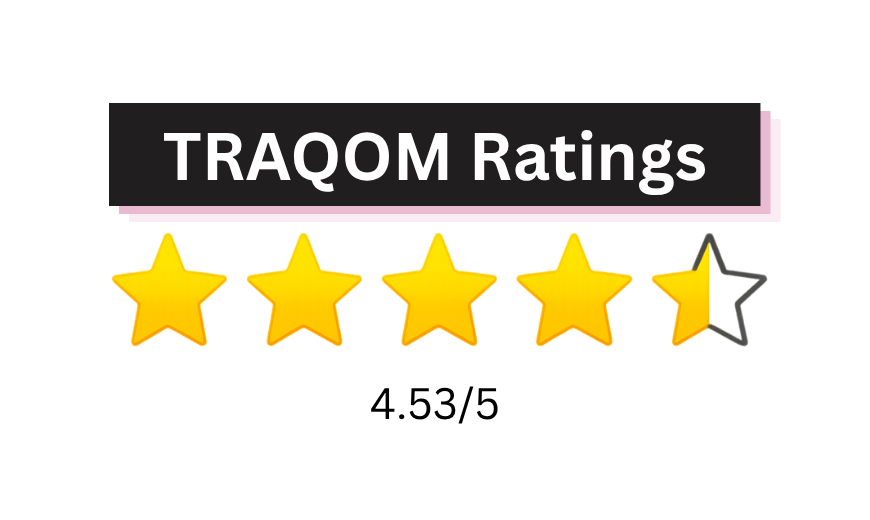
Training Quality and Outcomes Measurement (TRAQOM) ratings are provided by trainees who have completed SSG-funded courses. These ratings reflect trainees’ overall learning experience and their likelihood of recommending the course to others.

Book Class Now!