Advanced Excel Course for Workplace Productivity – WSQ Singapore
 | 2 Days Course |
 | SkillsFuture Credit |
| UTAP Eligible |
- Course Introduction
- Course Outline
- Requirements
- FAQs
Course Overview
Workplace Productivity using Excel – Advanced Level
Workplace Productivity using Excel – Advanced Level will equip learners with the skills and knowledge needed to understand common statistical techniques used in the workplace, identify the types of statistical software suitable for their organisation, perform data visualisation, apply PivotTables and PivotCharts, work collaboratively with multiple worksheets and workbooks, and automate workbook functionalities to improve data management, data analysis, and reporting for efficient operations management
Who should attend
This course is designed for working professionals who already use Microsoft Excel and want to improve their productivity and data analysis skills. It is suitable for those who need to manage data, create reports, and use advanced Excel features more efficiently in their daily work.
Examples of roles that should attend Workplace Productivity using Excel – Advanced Level
Individuals who use Excel regularly and want to enhance their data analysis skills
Professionals responsible for reporting, budgeting, or data management
Executives, managers, and team leaders who need to interpret and present data effectively
Administrative staff who frequently work with large datasets
Locations
Tampines Central, Toa Payoh central & Jurong East Central
Our course is conducted in a classroom setting, providing an interactive and engaging learning experience.
Tampines Central
300 Tampines Avenue 5, NTUC Income Tampines Junction #07-05, Singapore 529653 (Opposite Our Tampines Hub)
Toa Payoh Central
Blk 190 Toa Payoh Lorong 6, #02-514 Singapore 310190 (Above KFC)
Jurong East Central
2 Venture Drive, Vision Exchange, #07-23 Singapore 608526
Languages
English Language.
View the Microsoft Office Courses here.
About The Course Provider
ASSOCIATES, established in 2000, we provide management system consulting and training services to over 1,200 companies in Singapore and the region, including Malaysia and Indonesia.
Backed by a strong network of technical experts, we deliver objective third-party insights to help improve business processes and operations. Our expertise covers Quality, Environmental, and Occupational Health & Safety systems, aligned with ISO 9001, ISO 14001, and OHSAS 18001 standards.
Course Details
Course Details
Course Reference Number:
TGS-2025060412
Course Duration:
2 Days (16 Hours)
Course Provider:
ASSOCIATES CONSULTING PTE. LTD. (UEN: 200006697N) [SSG-approved vendor]
Price:
Full Course (Non-Singaporeans and Singaporeans/PRs Below 21): $575.52
Singaporean 40 yrs and above (after subsidy): $205.92
Singaporean 21-39 yrs/PR (after subsidy): $311.52
Certification:
Statement of Attainment (SOA)
Venue(s):
Toa Payoh Central, Jurong East Central, Tampines Central
Language:
English
Course Outline
LO1: Implement Basic Operations of Statistical Techniques in Microsoft Excel.
- Basic Operations of Statistical Techniques
- Types of Stastistical Software
LO2: Analyse Data using Data Visualisation Techniques to identify trends and patterns.
- Create Charts
- Modify and Format Charts
- Use Advanced Chart Features
LO3: Implement Regression Analysis to identify trends and patterns.
- Simple Linear Regression
- Multiple Linear Regression
LO4: Apply PivotTables and PivotCharts to improve data analysis to identify trends and patterns.
- Create a PivotTable
- Analyze PivotTable Data
- Present Data with PivotCharts
- Filter Data by Using Timelines and Slicers
LO5: Collaborate with various stakeholders by working with multiple worksheets and workbooks to identify data for further analysis.
- Use Links and External References
- Consolidate Data
LO6: Collaborate with various stakeholders by implementing workbook automation to identify data for further analysis.
- Apply Data Validation
- Search for Invalid Data and Formulas with Errors
Certification
You will receive a Statement of Attainment (SOA) from SkillsFuture Singapore upon successful completion of this module and its assessment
Visit this page for more Microsoft Office courses in Singapore.
Pre-requisites
Admission requirements:
- Minimum: Primary Level
- Language: Workplace Literacy and Numeracy Level 2 (WPLN: Speaking, Writing, Listening, reading, and Numeracy at ESS level 2).
Working Experience
- Recommended to have some working experience.
Duration
- 2-days course (16 hours)
Price
| Individual Sponsored (After Subsidy) | SME Company Sponsored (After Subsidy) | |
| Full Course Fee | $575.52 (Foreigners and those not eligible for subsidies) | $575.52 (Foreigners and those not eligible for subsidies) |
| For Singaporeans Aged 39 and Below | $311.52 | $311.52 |
| For Singaporeans Aged 40 and Above | $205.92 | $205.92 |
Eligible Singapore Citizens can use their SkillsFuture Credits to offset course fee payable after funding.
Frequently Asked Questions About Workplace Productivity using Excel– Advanced Level
What will I learn in this course?
Participants will learn advanced Excel functions, data analysis techniques, and tools to manage large datasets and create more efficient reports.
Do I need prior Excel knowledge?
Yes. Participants should have basic knowledge of Excel, including formulas, formatting, and simple data management.
What topics will be covered in this course?
The course typically covers advanced formulas and functions, data analysis techniques, PivotTables and PivotCharts, data validation, conditional formatting, and methods to manage and analyse large datasets more efficiently.
How will this course benefit participants in the workplace?
Participants will learn how to automate repetitive tasks, analyse complex data more effectively, and create professional reports and dashboards. These skills can help improve productivity and support better decision-making within the organisation.
What should participants bring to the class?
Participants are usually required to bring a laptop with Microsoft Excel installed to fully participate in the hands-on exercises during the training.
Related Courses

Excel Course Singapore
This Excel Course Singapore provides learners with a basic understanding of spreadsheets. Participants will learn how to create, format, and modify worksheets, use basic formulas and functions, and present data using charts.
Intermediate Excel Course
This Intermediate Excel course builds on the Basic Excel course and helps learners improve their skills in managing data, analysing information, and presenting insights to support better decision-making at work

Microsoft CoPilot Course
The Microsoft CoPilot Course helps to improve workplace productivity. Participants will learn how to integrate Copilot into workflows, apply its key features effectively, and support adoption within their organisation

| FULL COURSE FEE (Non Singaporeans and Singaporeans/PRs Below 21) | $575.52 |
|---|---|
| SINGAPOREAN 40 YRS AND ABOVE (AFTER SUBSIDY) | $205.92 |
| SINGAPOREAN 21-39 YRS/PR (AFTER SUBSIDY) | $311.52 |
| Duration | 2 Days (16 hours) |
Available in: English
Trainees’ Ratings
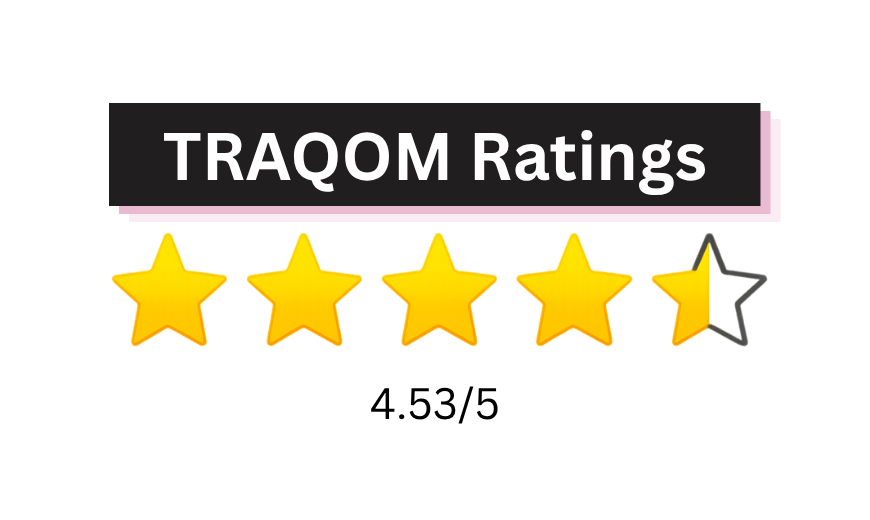
Training Quality and Outcomes Measurement (TRAQOM) ratings are provided by trainees who have completed SSG-funded courses. These ratings reflect trainees’ overall learning experience and their likelihood of recommending the course to others.

Book Class Now!