
Copilot Course – Generative AI Productivity
 | 2 Day Course |
 | SkillsFuture Credit |
| UTAP Ineligible |
- Course Overview
- Course Outline
- Requirements
- FAQs
Microsoft CoPilot: Enhancing Productivity with Generative AI
Course Duration: 2 Day (16 Hours)
Course Provider: Associates Consulting Pte Ltd
Course Reference Number: TGS-2025056192
UEN: 200006697N
Funding Validity Period: 26 Jun 2025 to 25 Jun 2027
Course Overview
This intensive 2-day program empowers participants to utilize Microsoft CoPilot for transforming work processes. The course focuses on bridging essential knowledge gaps by helping learners identify areas where CoPilot can be integrated into workflows, plan a seamless transition from basic features to advanced CoPilot-driven applications, foresee potential challenges during this transition, and develop effective training strategies for various CoPilot use cases within the organization.
Course Title
Microsoft CoPilot: Enhancing Productivity with Generative AI
Learning Outcomes
Upon completion of this course, participants will be able to:
- Use Copilot across Microsoft 365 apps, including Word, Excel, Outlook, PowerPoint, and Teams.
- Identify tasks that can be automated to boost productivity with AI.
- Overcome common challenges when integrating Copilot into daily workflows.
- Plan a smooth and effective rollout of Copilot tools within an organization.
- Equip their team with the necessary skills to use Copilot effectively.
Course Outline
This course will cover the following topics:
- Introduction to Microsoft Copilot: Understanding the features and capabilities of Copilot as an AI assistant within Microsoft 365.
- Enhancing Document Creation with Copilot in Word: Learn to generate reports, rephrase content, summarize documents, and draft proposals.
- Automating Data Analysis with Copilot in Excel: Use AI to automate data analysis, generate formulas, create charts, and gain insights.
- Streamlining Communication with Copilot in Outlook: Learn to write, summarize, and reply to emails quickly and organize messages efficiently.
- Designing Presentations with Copilot in PowerPoint: Create slide decks from documents or outlines, rewrite text, and get visual suggestions.
- Improving Collaboration with Copilot in Teams: Learn to summarize meeting transcripts, generate action items, and get updates on discussions.
- Strategic Implementation: Develop a plan for integrating and rolling out Copilot within your organization to ensure a smooth adoption.
AI Tools Used
Microsoft 365 Suite: The course will cover the use of Copilot within Word, Excel, Outlook, PowerPoint, and Teams.
Microsoft Copilot: An AI-powered assistant integrated into Microsoft 365 to enhance productivity and automate tasks.
Mode of Training
- Classroom-Based Training
- Duration: 2 Days (16 hours – including assessment)
Available in:
This course is available in English
Course Funding Options
Eligible Singaporeans can use SkillsFuture Credit to offset course fees, while NTUC members can utilise UTAP for up to 50% funding (capped at $250 per year). Companies can also benefit from Absentee Payroll (AP) funding at $4.50 per hour, capped at $100,000 per year.
Funding Eligibility Criteria
| Individual Sponsored Trainee | Company Sponsored Trainee |
| – Singapore Citizens or Singapore Permanent Residents – From 1 October 2023, all attendance-taking for SkillsFuture Singapore’s (SSG) funded courses must be done digitally via the Singpass App. This applies to both physical and synchronous e-learning courses – Trainee must achieve at least 75% attendance – Trainee must pass all prescribed tests/assessments and attain 100% competency – We reserve the right to claw back the funded amount from trainee if he/she does not meet the eligibility criteria | – Singapore Citizens or Singapore Permanent Residents – From 1 October 2023, all attendance-taking for SkillsFuture Singapore’s (SSG) funded courses must be done digitally via the Singpass App. This applies to both physical and synchronous e-learning courses – Trainee must achieve at least 75% attendance – Trainee must pass all prescribed tests/assessments and attain 100% competencyWe reserve the right to claw back the funded amount from trainee if he/she does not meet the eligibility criteria |
Funding Types
| Individual Sponsored Trainee | Company Sponsored Trainee |
| SkillsFuture: – Eligible Singapore Citizens can use their SkillsFuture Credits to offset course fee payable after funding UTAP: – This course is eligible for Union Training Assistance Programme (UTAP) – NTUC members can enjoy up to 50% funding (capped at $250 per year) under UTAP | Absentee Payroll (AP) Funding: – $4.50 per hour, capped at $100,000 per enterprise per calendar year – AP funding will be computed based on the actual number of training hours attended by the trainee |
Microsoft CoPilot: Enhancing Productivity with Generative AI
By the end of the course, learners will be able to:
- LO1. Evaluate the effectiveness of Microsoft CoPilot’s features in different work scenarios to determine potential implementation strategies
- LO2. Forecast challenges that may arise during the integration of CoPilot into existing work processes
- LO3. Develop strategies to facilitate a seamless transition from traditional Microsoft application usage to CoPilot-enhanced workflows
- LO4. Coordinate training to equip staff with the necessary skills to utilize CoPilot effectively in various work contexts
Certification
You will receive a Statement of Attainment (SOA) from SkillsFuture Singapore upon successful completion of this module and its assessment
Visit this page for more Microsoft Office courses in Singapore.
Who Should Attend
- Anyone looking to improve presentation skills with technology tools
- Professionals involved in client presentations, training, or internal updates
- Business development, sales, and marketing teams
- HR professionals conducting training or pitching initiatives
Pre-requisites
- 2 years of PME working experience in any sector
- Workplace Literacy and Numeracy (WPLN) 5 or equivalent
- Proficient with the use of a Windows Laptop or Macbook
Learners without the right WPLN or equivalent qualifications can be accepted if they have at least 3 years of relevant working experience in supervisory/managerial roles, subject to the MR’s approval.
Relevant Job Role(s)
- Sales Executives & Business Development Managers
- Marketing Professionals
- Trainers & Facilitators
- Corporate Communications Specialists
- Project Managers & Team Leads
- HR Practitioners
- Consultants & Client-Facing Professionals
Microsoft CoPilot: Enhancing Productivity with Generative AI
Q1: Do I need to bring a laptop?
Yes, please bring a laptop with Microsoft Copilot installed for hands-on activities. If you don’t have one, don’t worry — we may be able to provide a laptop for use during the class.
Q2: Will I get a certificate?
Yes, you’ll receive a WSQ Statement of Attainment upon successful completion.
Q3: How am I assessed?
There will be a short, written assessment, and a practical presentation task on Day 2.
Related Courses

Microsoft Office Excel Course
This Intermediate Excel course builds upon the foundational knowledge presented in Workplace Productivity using Excel (Basic level) and will help start you down the road to creating intermediate and advanced level workbooks and worksheets
$457.80

Microsoft Office Powerpoint Course
Microsoft Office Powerpoint Course equip learners with the knowledge and abilities to plan, design, and script presentations that fulfill defined objectives and meet the information needs of the target
$490.50

Present with Flair in PowerPoint
Advanced Microsoft Powerpoint Course is a certification programme for learners who wish to create effective, high-impact presentations using advanced features and who need to be able to prove their skills in this area.
$490.50

| FULL COURSE FEE (Non Singaporeans and Singaporeans/PRs Below 21) | $1,308.00 |
|---|---|
| SINGAPOREAN 40 YRS AND ABOVE (AFTER SUBSIDY) | $468.00 |
| SINGAPOREAN 21-39 YRS/PR (AFTER SUBSIDY) | $708.00 |
| Duration | 2 Day (16 hours) |
Available in: English
Trainees’ Ratings
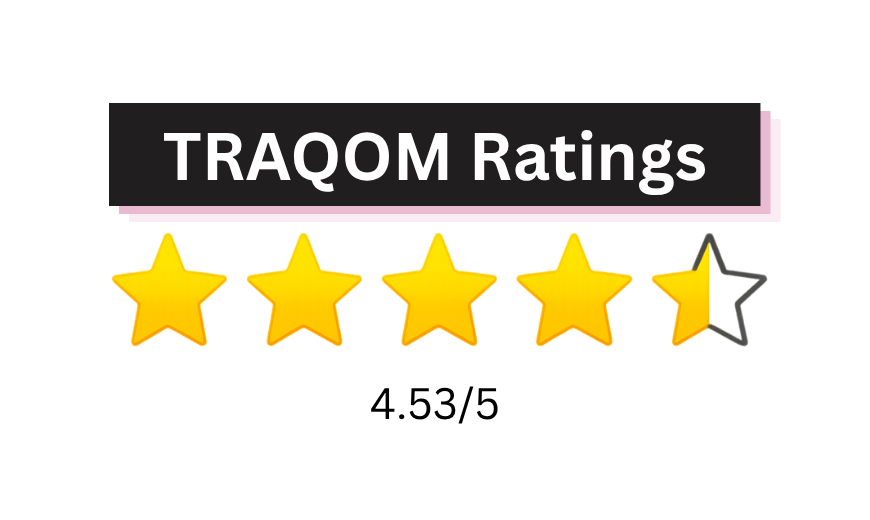
Training Quality and Outcomes Measurement (TRAQOM) ratings are provided by trainees who have completed SSG-funded courses. These ratings reflect trainees’ overall learning experience and their likelihood of recommending the course to others.

Book Class Now!